TTY Web Harness
A personal browser-terminal-over-tmux workspace with multi-session support and intelligent signaling.
The Problem & The Solution
The Bottlenecks
Heavy development workloads—like running massive test suites or AI-driven refactors—can throttle local hardware and drain battery life. Furthermore, being tethered to a specific device limits the ability to supervise complex, long-running processes on the go.
The Solution
TTY Web Harness unchains the developer from their desk. By bridging a web interface to persistent remote tmux sessions via Go and SSH, it provides high-performance compute on demand. You get authenticated, ubiquitous access to full-power hardware from any browser, anywhere.
A Full Grid of Sessions, at a Glance
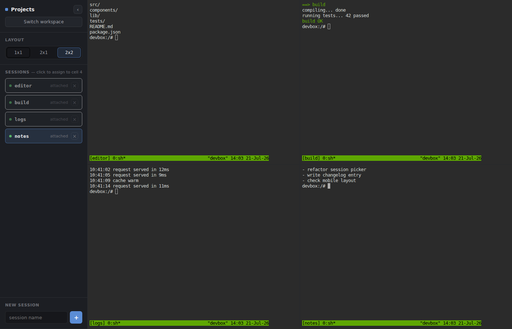
A workspace's saved layout and session assignments come back exactly as you left them — here a 2x2 grid keeping an editor session, a build, a log tail, and a notes pane all visible at once. Sessions live in the sidebar and can be reassigned to any cell with a click.
Key Features
Multi-Session Workspaces
Organize tmux sessions into named workspaces with saved grid layouts. Switch between them instantly via a dedicated picker.
Desktop Split-Pane Grid
A fully resizable split-pane interface allowing you to monitor multiple independent terminal connections side-by-side.
Mobile Optimized
Designed for on-the-go access with a single full-screen terminal view and a convenient slide-out session drawer.
Intelligent Signaling
Features 'needs attention' detection that listens for specific bell sequences, providing visual cues when your developer tools (like Claude Code) require input.
Have a project like this one?
We'd be glad to talk through your goals, your constraints, and whether we're the right team for the work.